


Workouts with context
Build routines, run active sessions, track sets and timers, record effort, and keep each session tied to useful history.
Training + nutrition by Elmvick
Training Logger connects the work you do with the food that helps you recover. Log workouts, save meals, import supported activity data from Health Connect, and let ElmvickAI turn training and nutrition context into practical next steps.
Why it is different
Most fitness apps record effort. Training Logger is built around what happens next: what you ate, how hard the session was, what signals your device shared, and what your body may need before the next workout.
Build routines, run active sessions, track sets and timers, record effort, and keep each session tied to useful history.
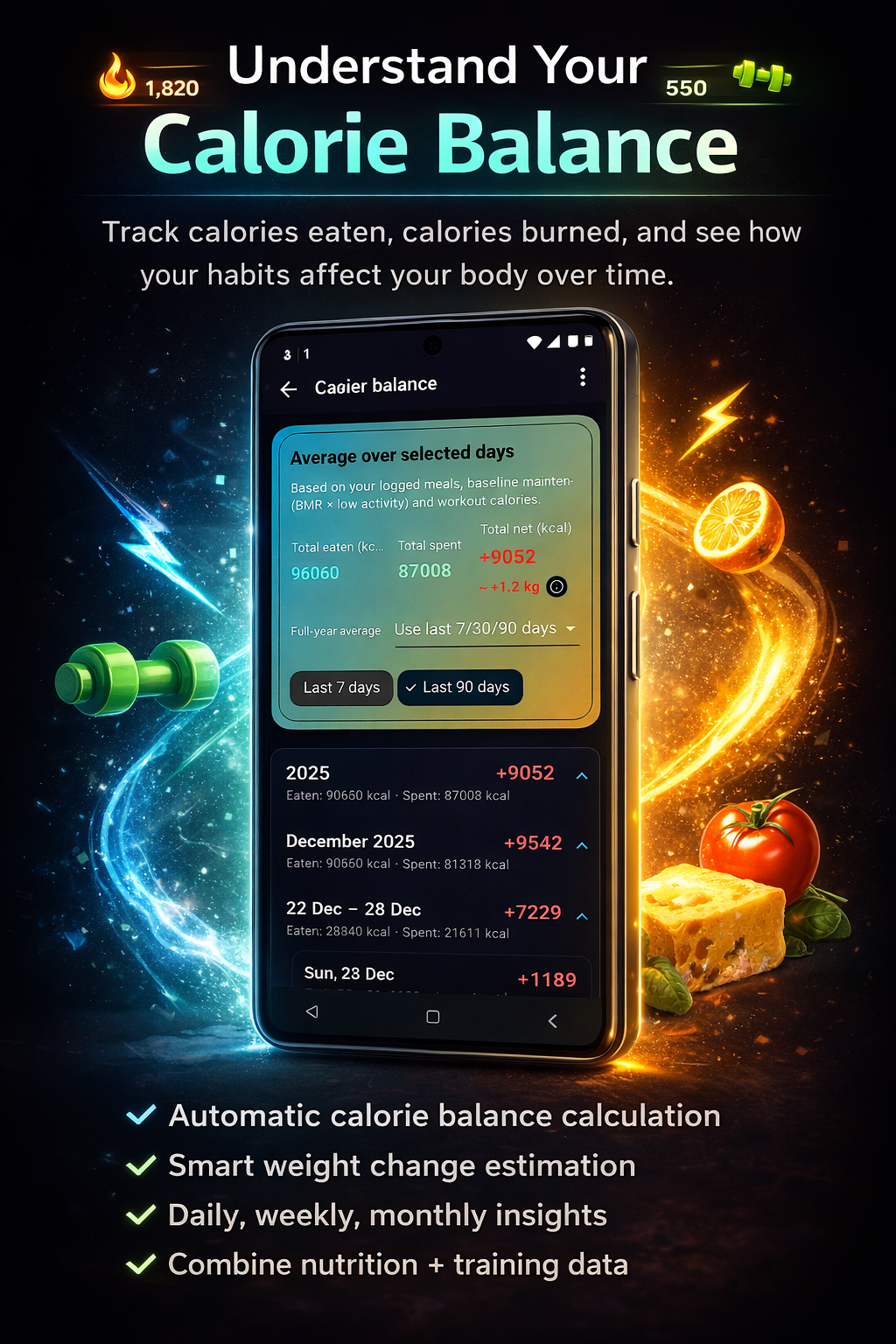
Log meals, estimate macros with AI, compare eaten versus spent calories, and see post-workout refill guidance when training creates demand.
Ask ElmvickAI about training, food, recovery, and plan ideas with the context you have already logged instead of starting from scratch every time.
Who it helps
Training Logger is for people who want the workout log and the nutrition log to finally talk to each other.
Import supported sessions from Health Connect where available, review weekly load, compare training demand with food, and spot missing signals that would make the picture sharper.
Track exercises, sets, weights, time, and session score, then connect hard training days with protein-focused recovery and calorie balance.
Save quick meals, run fast workouts, ask AI for practical help, and keep progress visible without juggling disconnected tools.
ElmvickAI
Use AI to estimate meals, generate workouts, adjust training ideas, and ask recovery questions using the context you already saved in Training Logger.
How it works
Start a Training Logger workout, finish a routine, or import supported activity data from Health Connect when another fitness app shares it.
Review meals, macros, calories eaten, calories spent, and the gap between training demand and recovery fuel.
Use ElmvickAI, post-workout refill guidance, dashboards, and share cards to make the next training decision clearer.
What stands out
Training Logger brings effort, food, imported signals, and AI guidance into one place so the log feels useful after the workout ends.
See how meals, calories, and workouts affect the day instead of treating nutrition as a separate checklist.
Hard training can surface practical refill ideas and nutrition prompts when your body has just created demand.
Health Connect activities feed runner and athlete dashboards with weekly mix, sport focus, latest activity, load, and missing signals.
Devices and imports
Training Logger is not trying to replace your watch. The app is becoming the place where watch data, workout history, meals, and AI guidance meet.
Import supported Android exercise sessions when your fitness apps share them through Health Connect, including running, cycling, strength, HIIT, soccer, swimming, walking, hiking, and more.
The Wear OS companion is available for compatible watches through Google Play, supporting live Training Logger sessions, heart-rate capture through Health Services, and phone sync through the Wear OS Data Layer.
Planned exploration includes Apple HealthKit, Strava, Garmin, Polar, Coros, and FIT, GPX, or CSV imports so athletes can keep using the devices they already trust.
FAQ
Yes. Training Logger is built around connecting logged workouts, saved meals, macros, calorie balance, and recovery guidance in one place.
No. Your watch remains the best tool for live sensors and GPS. Training Logger focuses on importing, organizing, and interpreting training and nutrition context.
Android Health Connect-compatible apps and the Wear OS companion are current paths. Future source exploration includes Apple HealthKit, Strava, Garmin, Polar, Coros, and FIT, GPX, or CSV files.
Yes. The Wear OS companion is available through Google Play for compatible Wear OS watches, starting with live Training Logger sessions and heart-rate capture from the watch.
ElmvickAI helps with workout ideas, meal estimates, recovery questions, and practical guidance based on the training and nutrition context you save.
Training Logger is available on Google Play.
Download Training Logger on Google Play and keep workouts, meals, calorie balance, imported activity data, and ElmvickAI guidance in one focused fitness app.